
Ensure AppTweak fetches data for tracked apps in the future.
Certain endpoints, like App Reviews Search, only provide data for apps followed in AppTweak's ASO Tool. This is because we have no way to get that information without fetching it from time to time.
For other endpoints, such as App Metadata - History, AppTweak will fetch data on a best effort basis. Top-chart apps are fetched daily, but there may be instances where the data retrieval is incomplete.
You might already be used to that interaction if you use AppTweak's ASO Tool and if you already follow the apps you need information there, you don't need to take any action here. However, if you don't use the tool, we recommend that you track apps for which you might be interested in. Tracking an app will prioritize its data retrieval.
The result may take up to 24 - 48 hours to show after you start following the app.
The following endpoints are available for tracked applications:
- Tracked Applications - Create to start tracking an app
- Tracked Applications - List to list your tracked apps
- Tracked Applications - Update to update a tracked app
- Tracked Applications - Delete to delete a tracked app
The number of apps that you're allowed to track depends on your API plan. You can find your limit in the company usage section.
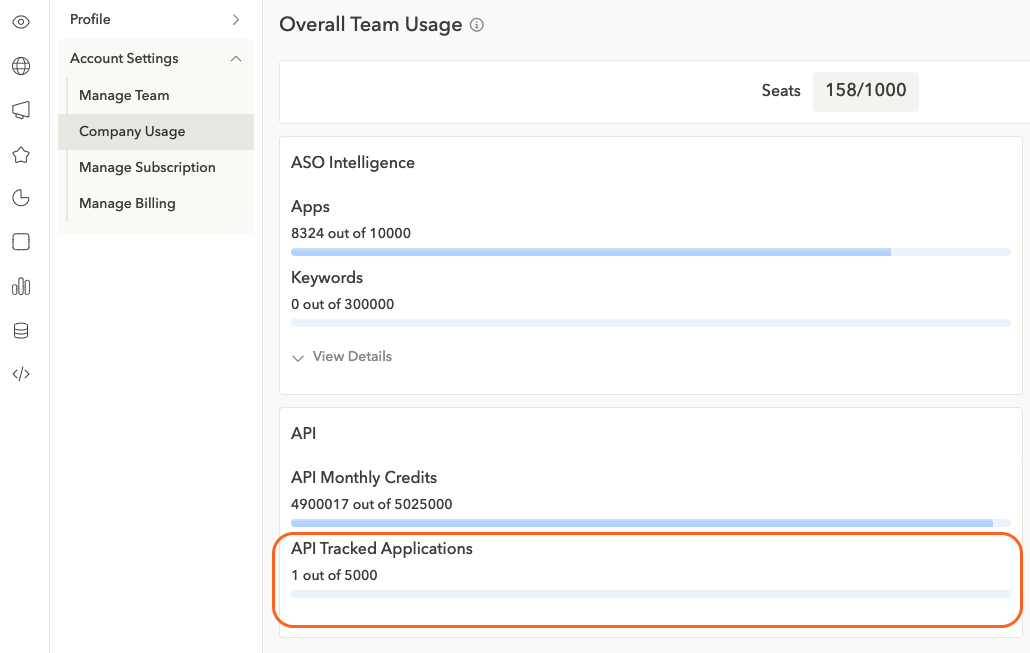
Tracked apps are linked to your user and API token. Deleting a user will also remove all tracked apps—this action cannot be undone.
A tracked app is defined by an app id, country code, language code and device. For example: following the same app in Google Play in the US for English & Spanish will count as 2 tracked apps.
FAQs
How do I add an app to track via API?
You can start tracking an app with AppTweak's App Store API, specifically the Tracked Applications - Create endpoint (POST /user/tracked_applications), by sending its application_id in the request body. application_id is the only required field; if you omit country, it defaults to us, and device and language are inferred from the app ID's store when left out. The response returns the new tracking entry's id, which you'll need later to update or remove it. Expect data for the app to start showing up within 24-48 hours.
How do I make sure AppTweak has data for an app?
If an endpoint is returning missing or stale data for an app, the fix is to start tracking that app with AppTweak's App Store API, specifically the Tracked Applications - Create endpoint (POST /user/tracked_applications). Some endpoints, such as App Reviews Search, only return data for apps AppTweak has been asked to follow, since there's no way to fetch that data otherwise; others fetch on a best-effort basis and prioritize apps you explicitly track. Tracking an app moves it into the priority fetch queue — data typically appears within 24-48 hours of the tracking request, not instantly.
How do I list the apps I'm currently tracking via API?
You can retrieve every app you're tracking with AppTweak's App Store API, specifically the Tracked Applications - List endpoint (GET /user/tracked_applications), which takes no parameters. Each entry in the response array includes the tracking entry's id, the application_id, country, language, device, and created_at timestamp. Use the returned id values when you need to update or delete a specific tracked-app entry, since Update and Delete both identify entries by id rather than by application_id.
Can I track the same app in multiple countries or languages?
Yes — each combination of app ID, country, language, and device counts as a separate tracked app against your plan's limit. Following the same app on Google Play in the US for both English and Spanish, for example, counts as 2 tracked apps, not 1. There's no dedicated bulk-create endpoint: add each country/language/device combination with its own call to the Tracked Applications - Create endpoint, and check your plan's limit in the company usage section if calls start returning a 403.
How do I stop tracking an app or remove it from my tracked list?
You can stop tracking an app with AppTweak's App Store API, specifically the Tracked Applications - Delete endpoint (DELETE /user/tracked_applications), passing the tracking entry's id as a query parameter. Get that id from a prior List or Create call — Delete doesn't accept an application_id directly. Once deleted, AppTweak stops prioritizing that app's data retrieval, so there's no guarantee the data stays up to date afterward; the endpoint returns the deleted entry as confirmation.