
What is the AppTweak API MCP server?
The AppTweak API MCP server connects an AI agent such as Claude, Cursor or Codex to the AppTweak API. MCP (Model Context Protocol) is an open standard that lets AI agents discover and call external tools. Once connected, your agent reads the full API reference for free, then either calls endpoints for you or writes code that does. Calls that fetch data use credits from your API plan.
It is built for developers and data teams who want AppTweak API data in their code, agents, or pipelines.
The MCP server is one of three ways to work with AppTweak API data:
| Feature | Where it runs | What it does |
|---|---|---|
| AppTweak API MCP server (this page) | An AI client such as Claude, Cursor or Codex, with your API key | Your agent explores the API, answers a question, or writes integration code for you. Best for discovery and one-off analysis. |
| AppTweak API | Your own scripts, dashboards and pipelines, with your API key | Calls the endpoints directly. Best for anything you run repeatedly: a dashboard refresh, a scheduled export, a CI job. Cheaper and faster than routing through an agent. |
| Recipes | A notebook or script you start from | Ready-made Python and Ruby samples for known use cases. |
The common pattern for builders is MCP then direct API: let the agent figure out the calls, then run those calls from your own code.
Explore the whole API without an API key
Browsing costs nothing and needs no credentials. The MCP exposes two kinds of tool, and only one of them touches AppTweak:
Documentation tools — list-specs, list-endpoints, search-endpoints, get-endpoint, search, fetch, start-here-guide — read our indexed OpenAPI specs. No API key, no credits, no AppTweak account. Your agent can learn every endpoint, parameter and response schema before you have a subscription.
The execution tool — execute-request — makes a real API call. This is the only tool that reaches AppTweak's backend, the only one that needs your API key, and the only one that spends credits.
Two practical consequences:
- You can evaluate the entire API surface with an agent, for free, and decide afterwards whether you need a plan.
- If you're building something, the agent can design the whole integration from documentation and never spend a credit until you run it. See Build with AppTweak data.
Tools
| Tool | What it does | Key needed | Credits |
|---|---|---|---|
start-here-guide | Spec map, known gotchas, and pointers to the two workflows that need special handling. Call this first. | No | 0 |
list-specs | Lists the three indexed OpenAPI specs | No | 0 |
list-endpoints | Every route in one spec | No | 0 |
search-endpoints | Keyword search across endpoints | No | 0 |
get-endpoint | Full detail for one endpoint: parameters, response schema, examples | No | 0 |
search / fetch | Search and retrieve any documentation page or reference | No | 0 |
app-id-lookup | Resolve a store URL or app name to an AppTweak app ID | No | 0 |
gpc-keyword-installs-guide | Walkthrough for Google Play Console installs-per-keyword with a branded / generic / competitor breakdown | No | 0 |
execute-request | Runs a real API request; returns status, body, and the credit cost | Yes | Yes |
The three specs
Point your agent at the right one and it will find endpoints far faster.
| Spec | Covers |
|---|---|
apptweak-store-api | The main ASO dataset — app metadata and metrics, category and keyword rankings, reviews, keyword metrics, top charts, paid keyword bids |
apptweak-integrations-api | Data from accounts you have connected — App Store Connect, Google Play Console. Requires the connection to exist first; a 200 with empty data usually means it doesn't. |
apptweak-api | Utility endpoints — your credit balance, valid countries and languages, DNA reference data, tracked-applications CRUD |
Connect the AppTweak API MCP server to Claude, Cursor & Codex
The server is at https://developers.apptweak.com/mcp. Documentation tools work without authentication. To run API requests, pass your API key in the X-Apptweak-Key header. You'll find the key in your API dashboard.
Add to claude_desktop_config.json:
    {
      "mcpServers": {
        "apptweak api": {
          "command": "npx",
          "args": [
            "mcp-remote",
            "https://developers.apptweak.com/mcp",
            "--header",
            "X-Apptweak-Key: ${APPTWEAK_API_KEY}"
          ],
          "env": {
            "APPTWEAK_API_KEY": "YOUR-API-TOKEN"
          }
        }
      }
    }
Add to ~/.cursor/mcp.json:
    {
      "mcpServers": {
        "apptweak api": {
          "command": "npx",
          "args": [
            "mcp-remote",
            "https://developers.apptweak.com/mcp",
            "--header",
            "X-Apptweak-Key: ${APPTWEAK_API_KEY}"
          ],
          "env": {
            "APPTWEAK_API_KEY": "YOUR-API-TOKEN"
          }
        }
      }
    }
Add to ~/.codeium/windsurf/mcp_config.json:
    {
      "mcpServers": {
        "apptweak api": {
          "command": "npx",
          "args": [
            "mcp-remote",
            "https://developers.apptweak.com/mcp",
            "--header",
            "X-Apptweak-Key: ${APPTWEAK_API_KEY}"
          ],
          "env": {
            "APPTWEAK_API_KEY": "YOUR-API-TOKEN"
          }
        }
      }
    }
In the desktop app or IDE extension: Settings → MCP servers → Add server,
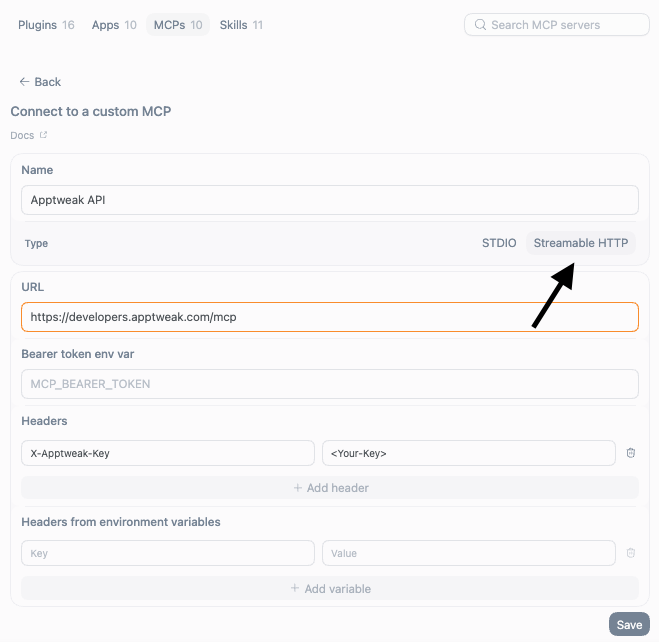
Replace YOUR-API-TOKEN with your API key.
Test the connection
Open a new chat in your client and ask something that needs the documentation, for example "Using the AppTweak API MCP, which endpoint returns the keyword rankings of an app?". The agent should call start-here-guide and search-endpoints and answer without spending credits. If the server doesn't show up, see Troubleshooting.
Costs and limits
- Documentation tools are free.
execute-requestspends credits from your API plan, exactly like a direct API call. Every response carriesmetadata.request.cost.- The API allows 60 requests per 10 seconds.
- An agent can fire many calls in one session, so credits deplete faster than they do with hand-written code. Read Credits and limits for agents before pointing an agent at a large job.
Before you build: read the gotchas
Call start-here-guide first, every session. It carries the current list of traps that will otherwise show up as wrong numbers in whatever you build — unreliable schema defaults, one deprecated endpoint that still appears in search results, and two endpoints whose default date ranges return empty. The same list is on Agent context files in a form you can paste into your repo.